¶ AI Agents
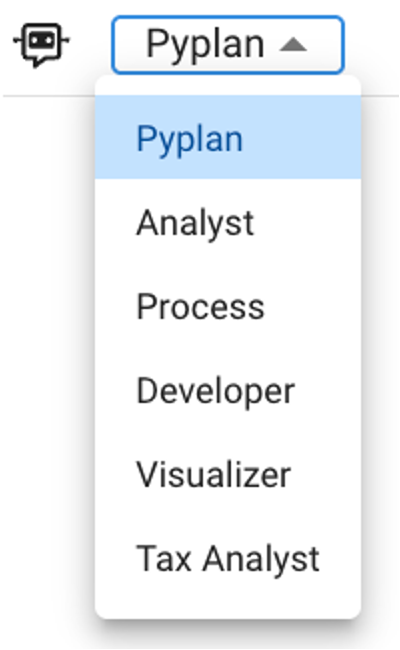
Pyplan includes several built-in agent types designed to assist users across different workflows. These agents come pre-configured with specialized roles, optimized behaviors, and access capabilities tailored to their purpose. They simplify user interactions, automate complex tasks, and guide users through model logic, analysis, or interface creation.
¶ Pyplan Agent
The Pyplan Agent focuses on platform-level knowledge. It understands the structure and capabilities of Pyplan and is able to:
- Answer questions about navigation, model organization, and core features.
- Explain how to use nodes, interfaces, dashboards, and tools.
- Provide guidance on best practices for building and organizing a Pyplan model.
- Help new users understand the platform’s workflow and concepts.
This agent acts as the user’s first point of contact when learning or troubleshooting Pyplan functionality.
¶ Analyst Agent
The Analyst Agent specializes in data analysis, offering analytical insights directly within Pyplan. Its capabilities include:
- Exploring datasets and generating summaries, trends, and descriptive statistics.
- Producing output in the form of interfaces, tables, or charts.
- Assisting with segmentation, comparison, anomaly detection, and basic modeling.
- Helping users interpret numerical results inside the context of the application.
It is ideal for applications that require quick, natural-language-driven analytical support.
¶ Process Agent
The Process Agent guides users through the workflow of the current application, ensuring proper execution of steps. It can:
- Explain how to interact with specific interfaces or nodes.
- Provide step-by-step instructions based on documentation embedded in the app.
- Validate whether the user is following the expected workflow.
- Reduce friction by helping non-technical users execute complex processes.
This agent is useful in operational applications where consistency and guidance are important.
¶ Developer Agent
The Developer Agent assists in the technical construction and maintenance of the Pyplan model. It is designed for advanced users and can:
- Help write node formulas or custom Python code.
- Explain logic flows, dependencies, and advanced modeling concepts.
- Suggest optimizations or improvements to node structure.
It accelerates model development and promotes best practices.
¶ Visualizer Agent
The Visualizer Agent focuses on interface creation and layout design. It assists with:
- Suggesting and generating charts, tables, filters, and other UI components.
- Guiding users on best practices for dashboard clarity and usability.
- Configuring interface properties such as formatting, interactions, and layout.
- Helping align visualizations with the analytical purpose of the application.
Ideal for users who need to build dashboards but are not experts in interface design.
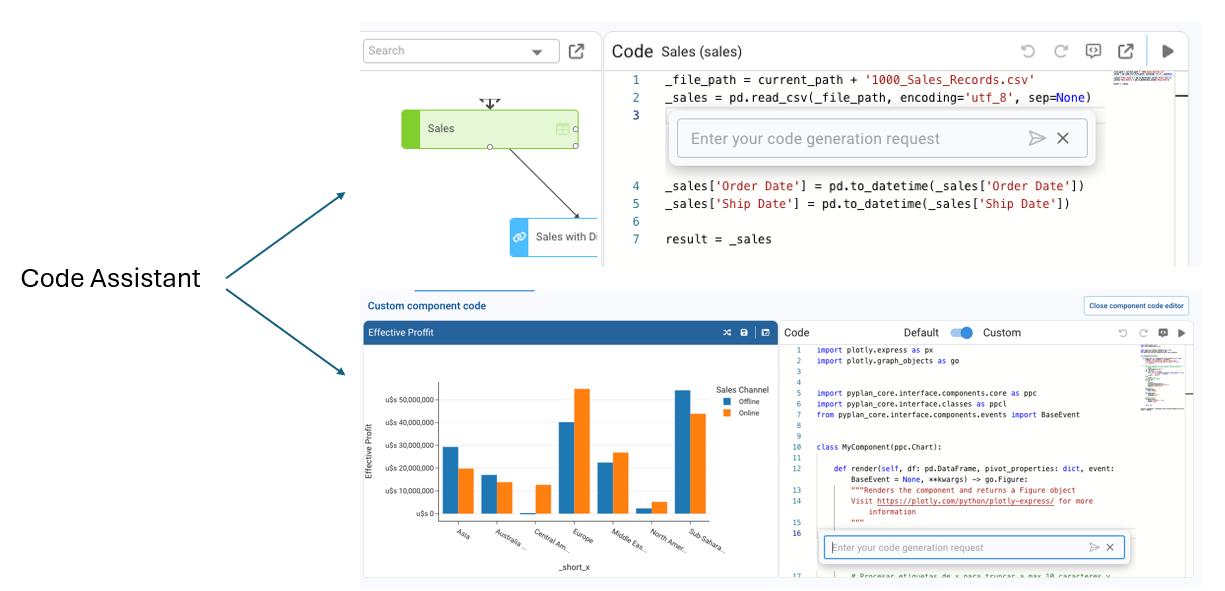
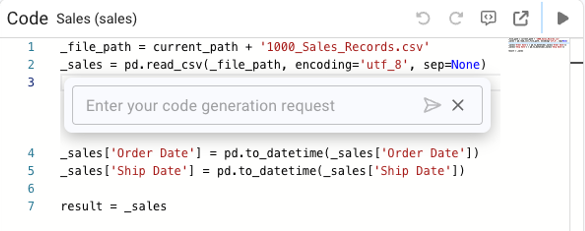
¶ Code Assistants
Code Assistants support Python-related tasks within Pyplan. They can:
- Generate node code or component-level Python.
- Suggest algorithms, formulas, scripts, or refactors.
- Assist in debugging or improving performance of Python routines.
- Reduce development time by automating repetitive coding tasks.
They are especially useful for developers working on logic-heavy or computational models.
¶ Custom Agents
Custom Agents allow application developers to create their own specialized AI assistants. They can:
- Use custom instructions for domain-specific behavior.
- Access selected model nodes to read or analyze data.
- Execute Python tools, automate tasks, and interact with other agents.
- Incorporate RAG (Retrieval-Augmented Generation) to enhance knowledge with documents.
This flexibility enables fully tailored agents for finance, operations, demand planning, forecasting, and more.
¶ Agent
The Agent class defines an AI agent inside Pyplan. Agents can execute instructions, access model nodes, use tools, interact with RAG (Retrieval-Augmented Generation), perform handoffs, and even be exposed as tools for other agents.
¶ Agent Class
class Agent(BaseModel):
    name: Optional[str] = None
    code: Optional[str] = None
    description: Optional[str] = None
    handoff_description: Optional[str] = None
    model: str = "gpt-4.1"
    instructions: Optional[str] = None
    tools: Optional[List[AgentTool]] = None
    handoffs: Optional[List[Agent]] = None
    agents_as_tool: Optional[List[AgentAsTool]] = None
    rag_settings: Optional[RAGSettings] = None
    visible: bool = True
    disabled: bool = False
    enable_on_sections: Optional[List[str]] = ['*']
    context_node_ids: Optional[List[str]] = None
    context_settings: ContextSettings = ContextSettings()
    output_type: Optional[Any] = None
¶ Parameter Summary
- name (str | None) — Human‑readable name of the agent.
- code (str | None) — Internal unique identifier.
- description (str | None) — Description of the agent’s purpose.
- handoff_description (str | None) — Explanation used when the agent participates in handoffs.
- model (str) — LLM model used by the agent. Default:
gpt-4.1. - instructions (str | None) — System-level instructions defining agent behavior.
- tools (List[AgentTool] | None) — Python functions available to the agent (nodes).
- handoffs (List[Agent] | None) — Other agents this agent may delegate to.
- agents_as_tool (List[AgentAsTool] | None) — Exposes agents so it can be invoked as a tool by other agents.
- rag_settings (RAGSettings | None) — Configuration for RAG document retrieval.
- visible (bool) — Sets whether the agent is visible in the UI.
- disabled (bool) — Enables or disables the agent.
- enable_on_sections (List[str] | None) — Restricts which model sections can activate the agent.
- context_node_ids (List[str] | None) — Nodes whose data the agent can read.
- context_settings (ContextSettings) — Controls how node context is loaded.
- output_type (Any | None) — Expected type of the agent’s final output.
¶ Custom Agent Examples
¶ Color Specialist Agent
from pyplan_core.classes.ai.Agent import Agent
result = Agent(
model = "gpt-4.1",
instructions = "You are a color specialist. The user will provide a color name and you must return its HEX value.",
)
¶ Agent With Access to Selected Nodes
from pyplan_core.classes.ai.Agent import Agent
result = Agent(
model = "gpt-4.1",
instructions = "You are an expert in data analysis with Python. Answer questions very concisely.",
context_node_ids = []
)
¶ RAG‑Enabled Agent
from pyplan_core.classes.ai.Agent import Agent, RAGSettings
result = Agent(
model = "gpt-4.1",
instructions = RAGSettings.DEFAULT_INSTRUCTIONS,
rag_settings = RAGSettings(
source_path = current_path + 'rag/source',
chroma_db_path = current_path + 'rag/db',
)
)
¶ Sentiment Classification Agent
from pyplan_core.classes.ai.Agent import Agent

result = Agent(
model = "gpt-4.1",
instructions = """
You classify the user's emotional state from the text.
Possible states: happy, neutral, angry, indeterminate.
Return an object with:
- state
- justification
"""
)

¶ Correlation Analysis Agent With Email Output
from pyplan_core.classes.ai.Agent import Agent


result = Agent(
model = "gpt-4.1",
instructions = """
ROLE: You are a data analyst agent. Analyze sales
data and temperature data, then generate an
executive summary in Spanish and email it.


INSTRUCTIONS:
- Summary: total sales, margin, top/bottom regions.
- Trends over time.
- Correlation sales vs temperature.
- Anomalies.
- Produce a 200–300 word executive summary.
- Use send_email tool to send to fbrussa@novix.com.
""",
context_node_ids = [],
tools=[]
)¶ .
¶ Agent Tool
The agent_tool decorator transforms a Python function into an AgentTool object that can be used inside Pyplan agents.

¶ Example Usage
from pyplan_core.classes.ai.Agent import agent_tool
from typing import Annotated
from function_schema import Doc

@agent_tool
def send_email(
    subject: Annotated[str, Doc('Email subject')],
    address: Annotated[str, Doc('Email address')],
    content: Annotated[str, Doc('HTML email body')],
):
    """Send an email according to the parameters provided"""
    return pp.send_email(html_content=content, emails_to=[address], subject=subject)
Add the tool to an agent:
agent = Agent(
    model="gpt-4.1",
    instructions="Your role...",
    tools=[send_email],
)