Google BigQuery Connection
Pyplan connects to Google BigQuery using the Google Cloud client library for Python. This integration is outbound from Pyplan to Google Cloud Platform and supports both reading data from BigQuery and writing data into BigQuery tables.
For IT and infrastructure teams, the key point is that Pyplan communicates with Google Cloud over HTTPS 443, and access should be governed through the customer's GCP security model, including service account permissions and any network or perimeter controls defined in the project.
Reference architecture
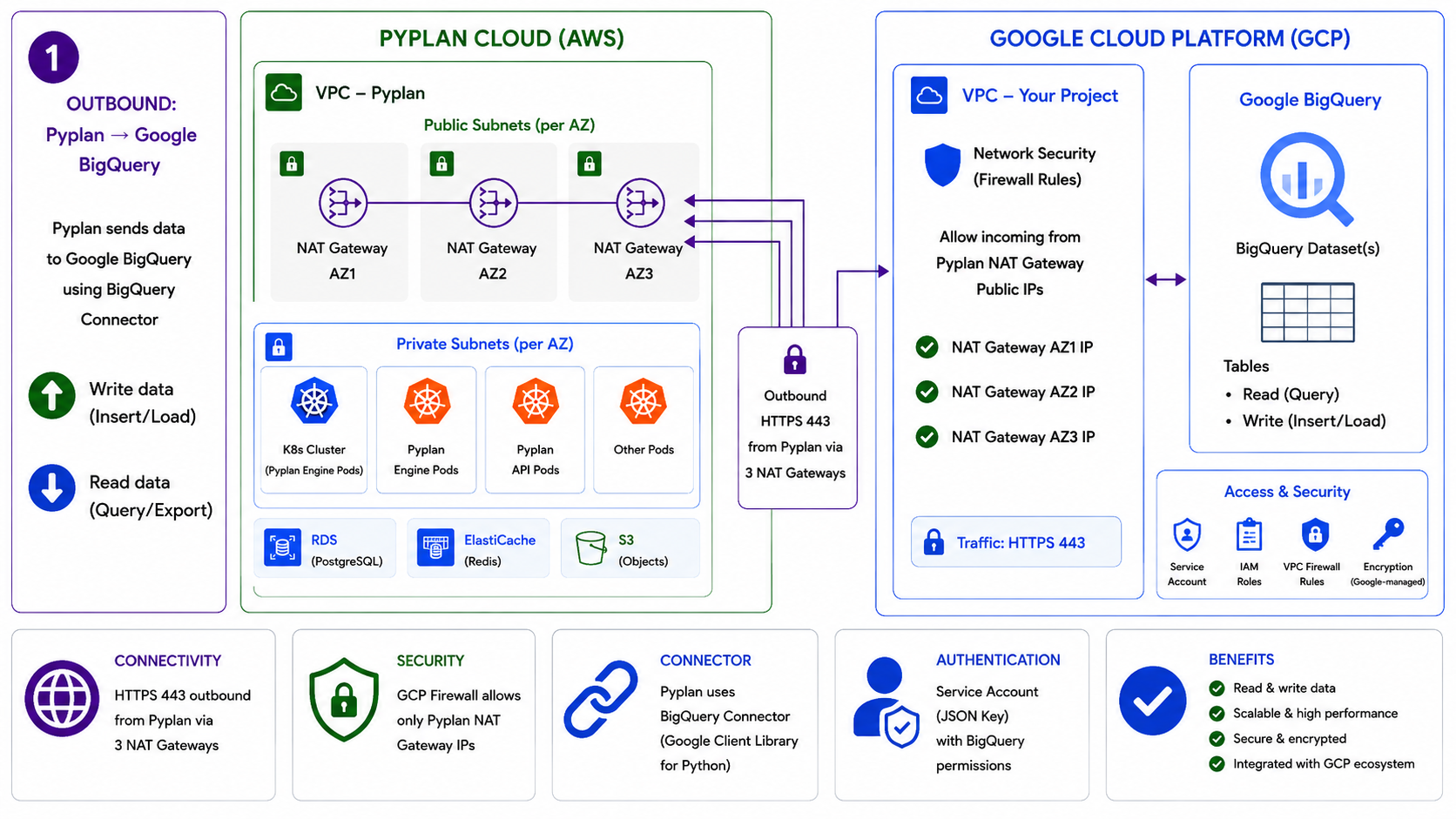
Integration flow
- Pyplan runs inside Pyplan Cloud on AWS.
- Outbound traffic leaves Pyplan through public NAT Gateways.
- Pyplan connects to Google Cloud over
HTTPS 443. - Authentication is performed with a Google Cloud Service Account JSON key.
- Pyplan reads data from BigQuery datasets or writes data into BigQuery tables, depending on the granted permissions.
Network and security requirements
- Communication is outbound only:
Pyplan -> Google BigQuery. - Protocol:
HTTPS - Port:
443 - If the customer's GCP environment uses perimeter or network controls, allow traffic from the public IPs used by Pyplan NAT Gateways. Request the corresponding IPs from the Pyplan team.
- Authentication is performed with a Google Cloud Service Account.
- Access to datasets and tables is controlled in GCP through IAM roles and dataset-level permissions.
- Data remains encrypted and governed by Google Cloud security controls.
Requirements
To connect to the google-cloud-bigquery library, a credentials file associated with the BigQuery project is required.
Default
project_id: Google Cloud project that contains the BigQuery resourcesdataset_id: BigQuery dataset to accesstable_name: BigQuery table to read from or write to- Service Account JSON key file with the required permissions
Service Account JSON key
Example structure:
{
  "type": "service_account",
  "project_id": "xxxx",
  "private_key_id": "xxxx",
  "private_key": "-----BEGIN PRIVATE KEY-----\nPRIVATE_KEY_CONTENT\n-----END PRIVATE KEY-----\n",
  "client_email": "xxxx",
  "client_id": "xxxx",
  "auth_uri": "xxxx",
  "token_uri": "xxxx",
  "auth_provider_x509_cert_url": "xxxx",
  "client_x509_cert_url": "xxxx",
  "universe_domain": "xxxx"
}
Authentication for IT teams
Pyplan uses a Google Cloud Service Account to authenticate against BigQuery.
The Service Account should have only the permissions required for the intended operation, for example:
- Read/query access to datasets and tables
- Insert/load permissions for write operations
The customer should share with Pyplan:
project_id- Service Account JSON key file
- Target dataset(s) and table(s)
- Any naming or environment conventions required by internal governance
What this integration enables
- Query data from BigQuery tables.
- Export data from BigQuery into Pyplan processes.
- Insert or load data generated in Pyplan into BigQuery.
- Keep data governance, IAM, and security controls under the customer's GCP administration.
GCP Library
Install the required library:
pip install google-cloud-bigquery
Connection
from google.cloud import bigquery
from google.oauth2 import service_account

credentials = service_account.Credentials.from_service_account_file(
    'path/to-file.json'
)

project_id = 'xxxx'
dataset_id = 'xxxx'
table_name = 'xxxx'

client = bigquery.Client(credentials=credentials, project=project_id)

# Test the connection with a table
table_ref = client.dataset(dataset_id).table(table_name)
table = client.get_table(table_ref)
rows = client.list_rows(table)
for row in rows:
    print(row)